
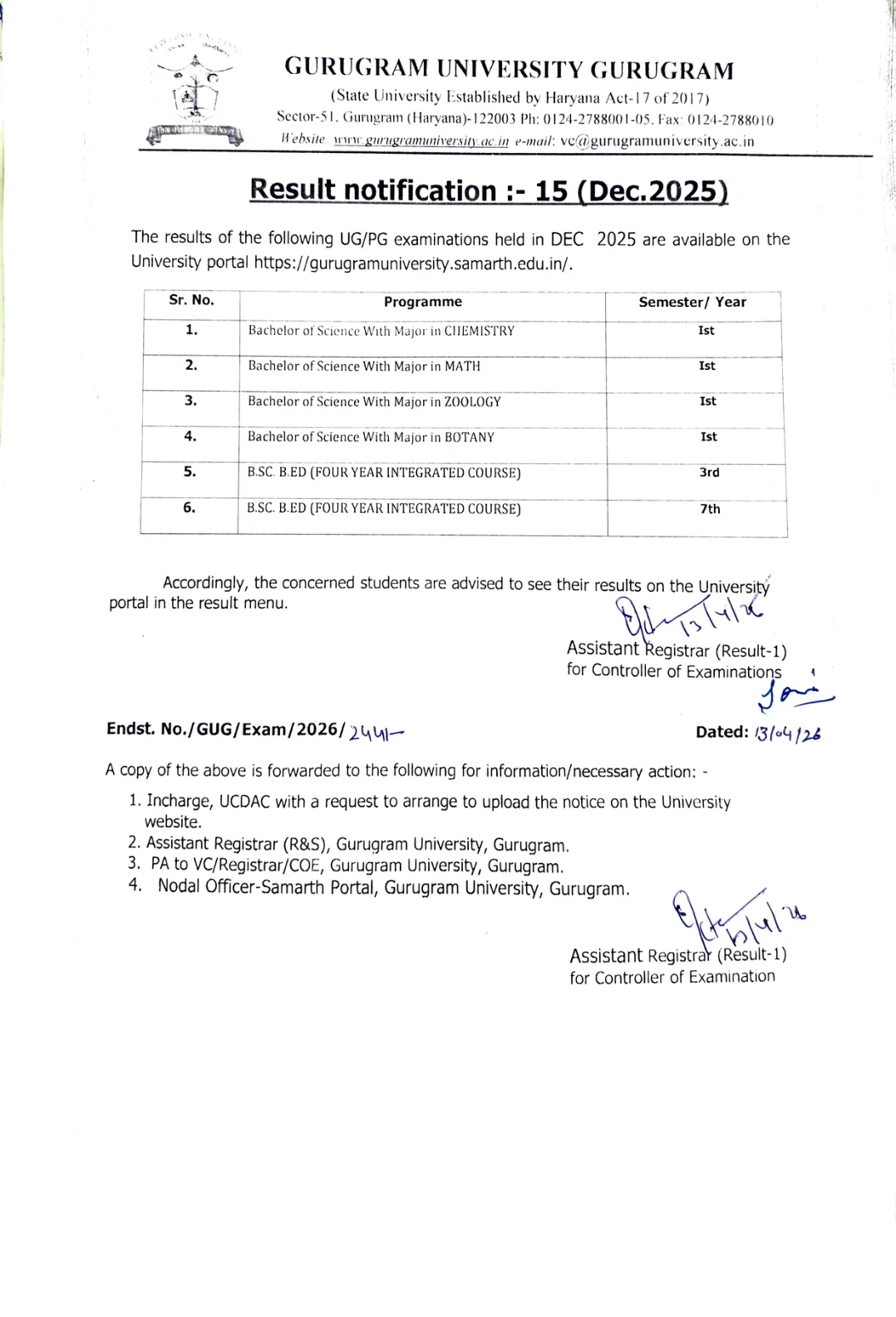
Students looking for the Gurugram University B.Sc Result 2026 should start with the university's official result notice instead of relying on copied result summaries. Gurugram University has published Result Notification No. 15 for the December 2025 examination session, and the notice clearly states that the results of the listed UG programmes are available on the university portal. That means the PDF notice works as a release confirmation, while the actual student-wise result has to be checked through the online result menu.
For this specific update, the listed courses are Bachelor of Science with Major in Chemistry, Math, Zoology and Botany for 1st semester, along with B.Sc B.Ed four-year integrated course for 3rd and 7th semester. This is useful because many students search only by semester, but the official notice groups the release by exact programme name. Matching the programme correctly is important before trying to open the result.
If you are checking your result for one of these courses, the safest route is to open the official Gurugram University website, use the result notice or portal link, and then check the result under the university portal's result menu. Keep your roll number, registration details, and course information ready so that you do not end up selecting the wrong programme entry.
Gurugram University B.Sc result 2026 status
Gurugram University has officially confirmed the release of selected B.Sc and B.Sc B.Ed results through Result Notification No. 15 for the December 2025 examination session. The notification states that the results are available on the university portal, and students should check them through the result menu.
This is not a full marksheet PDF published on the notice page. The notice only confirms which programmes and semesters have been declared. Students need to use the university portal to view their individual result.
Courses and semesters covered in this result update
| Programme | Semester or Year |
|---|---|
| Bachelor of Science With Major in Chemistry | 1st |
| Bachelor of Science With Major in Math | 1st |
| Bachelor of Science With Major in Zoology | 1st |
| Bachelor of Science With Major in Botany | 1st |
| B.Sc B.Ed (Four Year Integrated Course) | 3rd |
| B.Sc B.Ed (Four Year Integrated Course) | 7th |
If your course or semester is different from the list above, do not assume that your result is part of this same notification. Gurugram University often releases results in separate notifications.
Official links to check Gurugram University B.Sc result
| Purpose | Official link |
|---|---|
| Main website | https://gurugramuniversity.ac.in/ |
| Result notices page | https://gurugramuniversity.ac.in/allNotifications/resultNotice/index.php |
| Result Notification No. 15 PDF | Open official PDF |
| University portal | https://gurugramuniversity.samarth.edu.in/ |
The PDF confirms the declaration of the result, while the university portal is the place where students are directed to check the actual result.
How to check Gurugram University B.Sc result online
- Open the official Gurugram University website or the university portal.
- Go to the result section or the public notice or results area if needed.
- Match your programme with the official result notification.
- Open the result menu on the university portal.
- Enter the required student details such as roll number, registration number, or other asked credentials.
- Submit the details and open your result.
- Download or print the result for future use.
Before submitting, make sure you have selected the correct programme and semester. Many errors happen because students search under the wrong course title.
What the official result notice confirms
The official result notification gives three important pieces of information. First, it confirms that the listed B.Sc and B.Sc B.Ed results have been declared. Second, it ties the result to the December 2025 examination session. Third, it tells students that the result is available on the university portal and should be checked through the result menu.
This matters because some students expect a complete result gazette or marksheet PDF on the university notice page. In this case, the PDF is a release notice, not a student-wise result document.
Details you should verify after opening your result
- Your name and roll number
- Programme name
- Semester shown on the result
- Subject-wise marks or grades
- Total marks or SGPA if displayed
- Pass, fail, promoted, or any other result status
- Any discrepancy in personal details or paper codes
If anything looks wrong, keep a copy of the result page and contact the university or the examination branch with supporting details.
What to do if your result is not visible
If the result is not showing, first confirm that your course is part of this specific notification. Then check whether you entered the correct roll number or registration details. Temporary portal issues, wrong course selection, or incomplete data entry are common reasons for a missing result screen.
- Recheck the course name and semester
- Try the official portal again after some time
- Clear browser cache or use another browser
- Avoid using unofficial result pages
- Contact the university if the issue continues
Difference between the result notice and the actual result
The result notice is the official university announcement that a result has been declared for certain programmes and semesters. It does not necessarily carry each student's marksheet. The actual result is usually available after logging into or searching through the university portal's result menu.
For this Gurugram University update, the notice confirms the courses covered, while the portal is the place to retrieve the individual result record.
Re-evaluation and re-checking after the result
Gurugram University has a separate process for re-evaluation and related result corrections. Students who are not satisfied with their marks should wait for the relevant university instruction applicable to the concerned examination cycle and then apply only through the prescribed official process.
Do not rely on social media claims about re-evaluation dates. Always look for the university's own re-evaluation notice or form before taking any step.
Why students should use only official Gurugram University sources
Result summaries on third-party pages can help identify that an update exists, but the final and correct record must come from Gurugram University itself. Using the official website, the official result notification PDF, and the official university portal reduces the risk of checking the wrong programme or acting on an incomplete update.
For this topic especially, the official notice clearly lists only a limited set of B.Sc Major and B.Sc B.Ed semesters. That is why using the university's own notice is important before assuming coverage for other B.Sc results.
Official Links
Frequently Asked Questions
Yes. Gurugram University has issued an official result notification for selected B.Sc Major and B.Sc B.Ed semesters from the December 2025 examination session.
The notification covers Bachelor of Science with Major in Chemistry, Math, Zoology, and Botany for 1st semester.
The official notice covers B.Sc B.Ed four-year integrated course for 3rd and 7th semester.
You should check it through the official Gurugram University portal mentioned in the result notice.
No. The notice confirms the declared programmes, while the individual result has to be checked on the university portal.
Verify your course, semester, and login details first. If the issue continues, contact the university or examination branch.
Yes, but only through the official Gurugram University process when the relevant re-evaluation or re-checking notice is issued.