
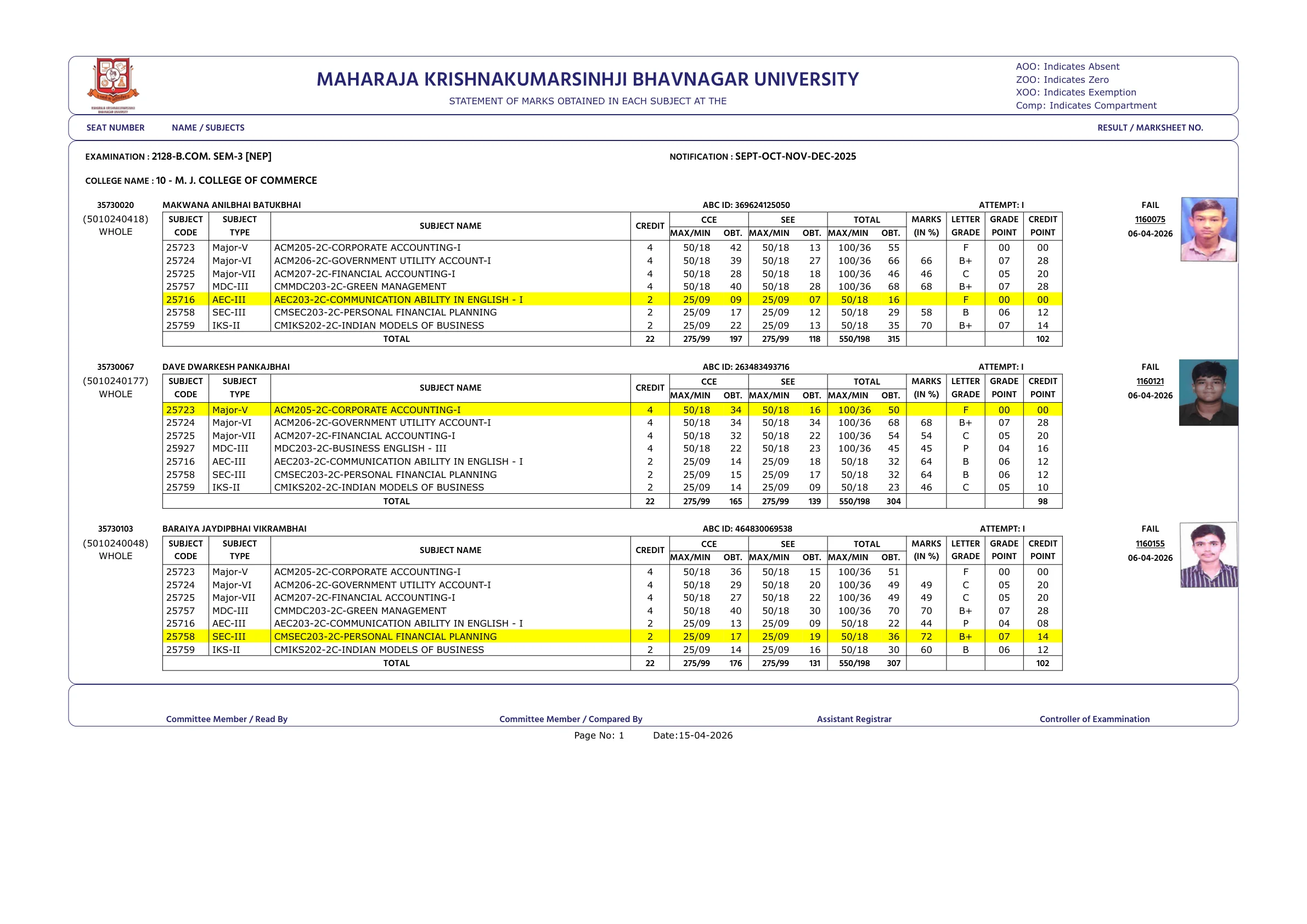
Maharaja Krishnakumarsinhji Bhavnagar University has released several 2026 result entries for undergraduate courses on its official result portal. For students searching specifically for BA, BSc and BCom semester 3 and 4 results, the important point is that MKBU is not using a single uniform result format. Some entries are standard press notifications that list successful seat numbers, while others are reassessment result PDFs that show subject-wise marks and the final result status.
The official result page currently shows a B.Com Sem-3 [NEP] reassessment entry, a B.Sc. (New CBCS) Sem-4 reassessment entry, and a B.A. (NEW CBCS) Sem-4 reassessment entry dated 15-04-2026. It also shows a B.A. (NEW CBCS) Sem-3 press notification dated 09-04-2026 and a B.Com. (New CBCS) Sem-4 press notification listed on the portal on 27-03-2026. Because the portal contains both reassessment files and press notifications, students should open the exact course-and-semester link instead of assuming all PDFs display marks in the same way.
This guide brings the official links together, explains which result types are available for each relevant semester, and shows you how to check your MKBU result properly. It also covers what to verify after downloading the PDF, where to find reassessment and marksheet-correction options, and what to do if your seat number or marks do not look right.
MKBU Result 2026 status and official link
MKBU has published the relevant 2026 UG result entries on its official result portal. Students looking for BA, BSc and BCom semester 3 and 4 results should start at the result page instead of relying on third-party result summaries.
The official result portal is: https://mkbhavuni.edu.in/mkbhavuniweb/result.php.
On that page, MKBU lists result entries by date, title, type and year. The entries reviewed for this article include reassessment PDFs and press notifications connected to BA, BSc and BCom semester 3 and 4 results in 2026.
Latest official BA, BSc and BCom semester 3 and 4 result entries
The table below summarises the relevant MKBU entries visible on the official result page for the topic covered here.
| Course and semester | Type | Portal date | Practical note |
|---|---|---|---|
| B.Com Sem-3 [NEP] | Reassessment | 15-04-2026 | Listed on the portal exactly as 2128-B.COM SEM-3[NEP] SEP-OCT-NOV-DEC-2026 |
| B.Sc. (New CBCS) Sem-4 | Reassessment | 15-04-2026 | Subject-wise marks PDF |
| B.A. (NEW CBCS) Sem-4 | Reassessment | 15-04-2026 | Subject-wise marks PDF |
| B.A. (NEW CBCS) Sem-3 | Press notification | 09-04-2026 | Seat-number based success list |
| B.Com. (New CBCS) Sem-4 | Press notification | 27-03-2026 | Portal listing appears on 27-03-2026; the PDF itself is dated 24-03-2026 |
| B.Sc. (I.T.) (New CBCS) Sem-3 | Press notification | 07-04-2026 | The reviewed PDF shows NIL |
This is why students should match the exact course title and semester before opening a PDF. A semester 3 or 4 result may be a general result list, a press notification, or a reassessment statement.
How to check MKBU semester results online
- Open the official MKBU result page.
- Look at the 2026 entries and match the exact course and semester, such as B.Com Sem-3 [NEP], B.Sc Sem-4, B.A Sem-4 or B.A Sem-3.
- Click the relevant PDF link.
- If it is a reassessment result PDF, check your seat number, subject-wise marks, total and result status.
- If it is a press notification PDF, search for your seat number in the pass list.
- Save the PDF and keep a copy for college use, reassessment, marksheet follow-up or record purposes.
MKBU also provides separate links on the result page for CBCS Provisional Marksheet and Yearly/External Provisional Marksheet. Those are separate from the result-entry list and may be useful after the result is published.
What kind of result PDF you should expect
MKBU is using at least two result formats in the entries reviewed here.
Reassessment result PDF: This format shows the candidate name, seat number, subject codes, internal and external marks, total marks, total semester marks and the final result status such as PASS or FAIL. The B.Sc. Sem-4 and B.A. Sem-4 files reviewed here follow this format.
Press notification PDF: This format is shorter and usually lists successful seat numbers only. The B.A. Sem-3 and B.Com. Sem-4 result files reviewed here follow this format.
This matters because some students expect every PDF to show detailed marks. On MKBU, that depends on the exact result link you open.
Course-wise notes for BA, BSc and BCom semester 3 and 4 entries
B.Com Sem-3 [NEP]: The official portal lists a reassessment result entry dated 15-04-2026. The title on the portal is 2128-B.COM SEM-3[NEP] SEP-OCT-NOV-DEC-2026. Students should use the direct official PDF or the result portal listing to open it.
B.Sc Sem-4: The reviewed official reassessment PDF is titled 2060-B.Sc. (New CBCS) Sem-4 - MAR-APR-MAY-2026 and is dated 15-04-2026 on the portal. This format shows subject-wise marks and the overall result status.
B.A Sem-4: The reviewed official reassessment PDF is titled 2058-B.A. (NEW CBCS) Sem-4 - MAR-APR-MAY-2026 and is dated 15-04-2026 on the portal. This is also a detailed marks statement PDF.
B.A Sem-3: The official portal shows a press notification dated 09-04-2026 for 2058-B.A. (NEW CBCS) Sem-3 MAR-APR-MAY-2026. This is a success list format rather than a full subject-wise marks PDF.
B.Com Sem-4: The official portal shows a press notification entry for 2059-B.Com. (New CBCS) Sem-4. The portal listing is visible under 27-03-2026, while the reviewed PDF itself carries the date 24-03-2026.
Science semester 3 note: In the official science-related semester 3 entry reviewed here, the visible PDF was B.Sc. (I.T.) (New CBCS) Sem-3 dated 07-04-2026, and the document states NIL. Students should therefore check the exact science course title rather than assuming a single general B.Sc semester 3 result file covers all science streams.
What to verify after downloading the result
After opening your result PDF, verify these points carefully:
- Course name and semester
- Your seat number
- Your name spelling
- College name
- Subject codes and titles
- Internal, external and total marks where shown
- Overall result status such as PASS, FAIL or compartment-related notation if any
- Marksheet or statement number, where applicable
If you are opening a press notification PDF instead of a detailed marks PDF, the document may not show full subject-wise marks. In that case, confirm your seat number first and then use the relevant marksheet or university process if you need a fuller academic record.
Reassessment, marksheet correction and follow-up options
MKBU has separate options on its student and examination pages for reassessment rules and forms, marksheet correction, duplicate marksheet and verification-related processes. Students who find an issue in their result should use the university's own follow-up route rather than waiting for unofficial updates.
In the official PDFs reviewed here, reassessment deadlines are mentioned inside the documents. For example, the B.A. Sem-3 press notification states that the last date for reassessment is 19/04/2026 plus 5 days with late fee, while the B.Com. Sem-4 press notification states 03/04/2026 plus 5 days with late fee. Always follow the date written in your exact PDF, because deadlines can differ by result entry.
If the issue is not about marks but about a name, subject, marksheet or document error, use the relevant MKBU marksheet correction or duplicate marksheet option available through the university website.
What to do if the result PDF does not open or your seat number is missing
If the PDF link is slow, times out or does not load on the first attempt, refresh the page and reopen the result from the official portal. University PDF links can be temporarily slow when many students are trying to access the same file.
If your seat number is not visible, first confirm that you opened the correct course, scheme and semester. MKBU lists separate entries for CBCS, NEW CBCS, NEP and specific course variants like B.Sc. (I.T.). A mismatch here is a common reason students think the result is missing.
If the file is correct and your details still do not appear as expected, contact your college or the MKBU examination section with your seat number, course, semester and a copy of the PDF entry you checked.
MKBU contact details and official resources
For result-related follow-up, students can use the university's official contact details and result resources.
- Maharaja Krishnakumarsinhji Bhavnagar University
- Gaurishanker Lake Road, Bhavnagar - 364001
- Phone: +91.278.2430002/6/7
- Email: registrar@mkbhavuni.edu.in
Useful official pages include the main website, the result page, the CBCS provisional marksheet page and the specific semester PDFs linked in this article. Keep the exact PDF you checked saved on your device so you can refer to it if you need reassessment or correction later.
Official Links
Frequently Asked Questions
You can check it on the official MKBU result portal at mkbhavuni.edu.in under the Result section.
The reviewed official entries include B.Com Sem-3 [NEP], B.Sc Sem-4 and B.A Sem-4 dated 15-04-2026, plus B.A Sem-3 and B.Com Sem-4 press notifications posted earlier on the MKBU portal.
Yes. The MKBU result portal shows a B.A. (NEW CBCS) Sem-3 press notification dated 09-04-2026.
Yes. The portal shows a B.Com. (New CBCS) Sem-4 press notification entry, and the reviewed PDF carries the date 24-03-2026.
Because MKBU is publishing different result formats. Reassessment PDFs can show subject-wise marks, while press notifications may only list successful seat numbers.
Use the university's reassessment, marksheet correction or related examination process through the official MKBU website, and contact your college or the examination section if needed.
Yes. The official result page also includes separate links for CBCS Provisional Marksheet and Yearly/External Provisional Marksheet.