
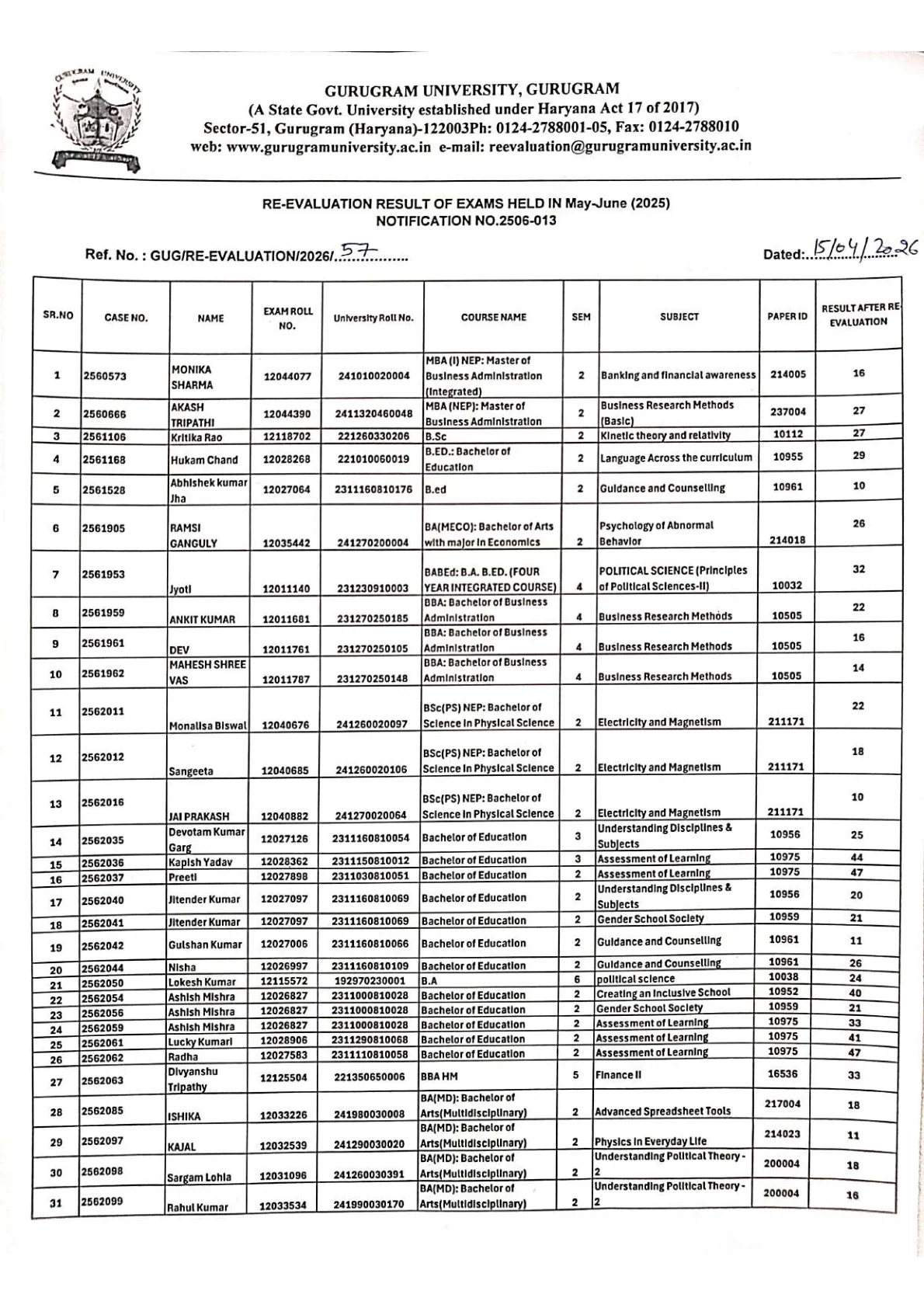
If you are looking for the Gurugram University re-evaluation result for the May-June 2025 examinations, the important part is that the university has already uploaded the official notification PDF on its website. Students do not need to rely on third-party summaries. The most useful source is the university notice PDF itself, because it lists the case details, course, semester, subject, paper ID, and the result after re-evaluation.
This page is written for students who want a practical answer: where to find the official file, how to search their entry inside the PDF, what the columns mean, and what to do if they do not find their name or if they are unsure whether the updated marks have been applied. Since re-evaluation results are often issued in batches, it is important to match the exact notification number and exam session before assuming that your case is missing.
For this update, the relevant exam session is May-June 2025, while the result notification was uploaded in April 2026. The official notice page shows the item on 16 April 2026, and the PDF itself carries Notification No. 2506-013. Students should therefore verify the document carefully and keep a copy of the PDF for record, admission, scholarship, or follow-up purposes.
Gurugram University Re-Evaluation Result 2026 Overview
Gurugram University has published the re-evaluation result for exams held in May-June 2025. This update is meant for students whose answer sheets were sent for re-evaluation and whose revised outcome has now been published through an official notification PDF.
The result is not presented as a separate mark sheet portal on the pages reviewed here. Instead, students need to open the official result notification PDF and locate their entry directly. That makes it especially important to use the correct notification number and not confuse this document with regular result notifications, re-appear results, or re-checking notices.
Official Release Date and Notification Number
The university notice section lists the re-evaluation result notification on 16 April 2026. The official PDF is titled for the re-evaluation result of exams held in May-June 2025 and carries Notification No. 2506-013.
The first page of the PDF also shows a dated entry of 15 April 2026. Students should treat the university website listing and the PDF together as the official record for this result batch.
How to Download the Official Re-Evaluation Result PDF
- Open the Gurugram University official website.
- Go to the notice or result notifications section.
- Find the entry titled Re-Evaluation Result of Exams held in May-June 2025 Notification No. 2506-013.
- Open the PDF and download it to your device.
- Use the search function in your browser or PDF reader to find your case number, roll number, or name.
This is the safest way to check the result because the notification PDF is the primary official record for the re-evaluation update.
What the Official PDF Includes
The result PDF is structured as a table. It is designed to help students identify their updated result after re-evaluation without needing a separate login. The columns visible in the notification include:
- Serial number
- Case number
- Name
- Exam roll number
- University roll number
- Course name
- Semester
- Subject
- Paper ID
- Result after re-evaluation
This format is useful because it allows students to verify not only the updated marks but also whether the correct subject and semester were processed.
Courses Covered in This Re-Evaluation Result
The notification is for both UG and PG cases and the visible entries in the PDF include multiple programmes rather than a single course. Examples visible in the uploaded notification include MBA, B.Sc, B.Ed, BA, BBA, B.Com, BBA HM, and related course variations.
This matters because students often search using a broad phrase like UG PG re-evaluation result. In practice, the official PDF lists individual cases across different programmes. You should therefore match your own course name, semester, and subject line carefully instead of assuming that every student from the same session is included in one line.
How to Search Your Entry Inside the PDF
After opening the PDF, use the search option on your device and try the following one by one:
- Your full name
- Your exam roll number
- Your university roll number
- Your case number, if available
If your name does not appear on the first attempt, try searching only one part of the name, because spelling, spaces, and capitalization may vary slightly. You should also manually review the rows around your course and semester if the search tool is not working properly on mobile.
What Result After Re-Evaluation Means
The column marked result after re-evaluation shows the marks or updated outcome recorded after the university completed the re-evaluation of the answer sheet for that subject. It is not the same as the original marks shown earlier in a regular result notification.
This means students should compare the updated figure in the re-evaluation result with their earlier result only for the relevant paper or subject. The re-evaluation notification is meant to show the revised outcome for the processed case, not to reproduce the full semester result card.
Difference Between Re-Evaluation, Re-Checking, Regular Result, and Re-Appear Result
Students often mix up different result notices on the Gurugram University website. These categories are not the same:
- Regular result means the original examination result.
- Re-evaluation result means the paper was re-assessed and a revised outcome has been notified.
- Re-checking result usually refers to verification or checking-related processing, not the same as full re-evaluation.
- Re-appear result refers to a later exam attempt for students who had to appear again.
Before taking any follow-up step, make sure you are reading the correct type of notice for your case.
Details to Verify After Downloading the Result
Once you find your entry in the PDF, check all details carefully. Even if the marks look correct, you should still verify the identification information because any mismatch can create problems later in record correction or mark sheet processing.
- Name
- Exam roll number
- University roll number
- Course name
- Semester
- Subject
- Paper ID
- Updated result after re-evaluation
If any of these fields appear wrong, keep the PDF copy and contact the university through official channels.
What to Do If Your Entry Is Missing or Still Unclear
If you do not find your name or roll number in this notification, do not assume immediately that the university rejected your case. Gurugram University has issued multiple re-evaluation notifications for May-June 2025 across different dates and notification numbers.
You should check whether your case may have been included in an earlier or later re-evaluation notification for the same exam session. Also confirm that your application was for re-evaluation and not for re-checking or another process. If needed, contact the examination or re-evaluation office with your case details.
Official Links and Contact Points
Students should use only the official Gurugram University pages for this result. The most useful links are the direct PDF, the result notifications page, and the examination branch page.
| Purpose | Official link |
|---|---|
| Direct re-evaluation result PDF | Open PDF |
| Result notifications listing | Open result notifications page |
| Examination branch | Open examination branch page |
| University home page | Open official website |
The PDF header also shows the re-evaluation email address as reevaluation@gurugramuniversity.ac.in, which may help students identify the correct office for follow-up.
Official Links
Frequently Asked Questions
Yes. Gurugram University has released the re-evaluation result notification for exams held in May-June 2025.
The official PDF carries Notification No. 2506-013.
Download the official PDF from the university website and search by your name, case number, exam roll number, or university roll number.
It is a re-evaluation result, which shows the updated outcome after the university processed the re-evaluation request.
The PDF includes case number, name, exam roll number, university roll number, course name, semester, subject, paper ID, and result after re-evaluation.
Check other Gurugram University re-evaluation notifications for the same exam session and confirm whether your case was for re-evaluation, re-checking, or another process.
Gurugram University is located in Haryana.