
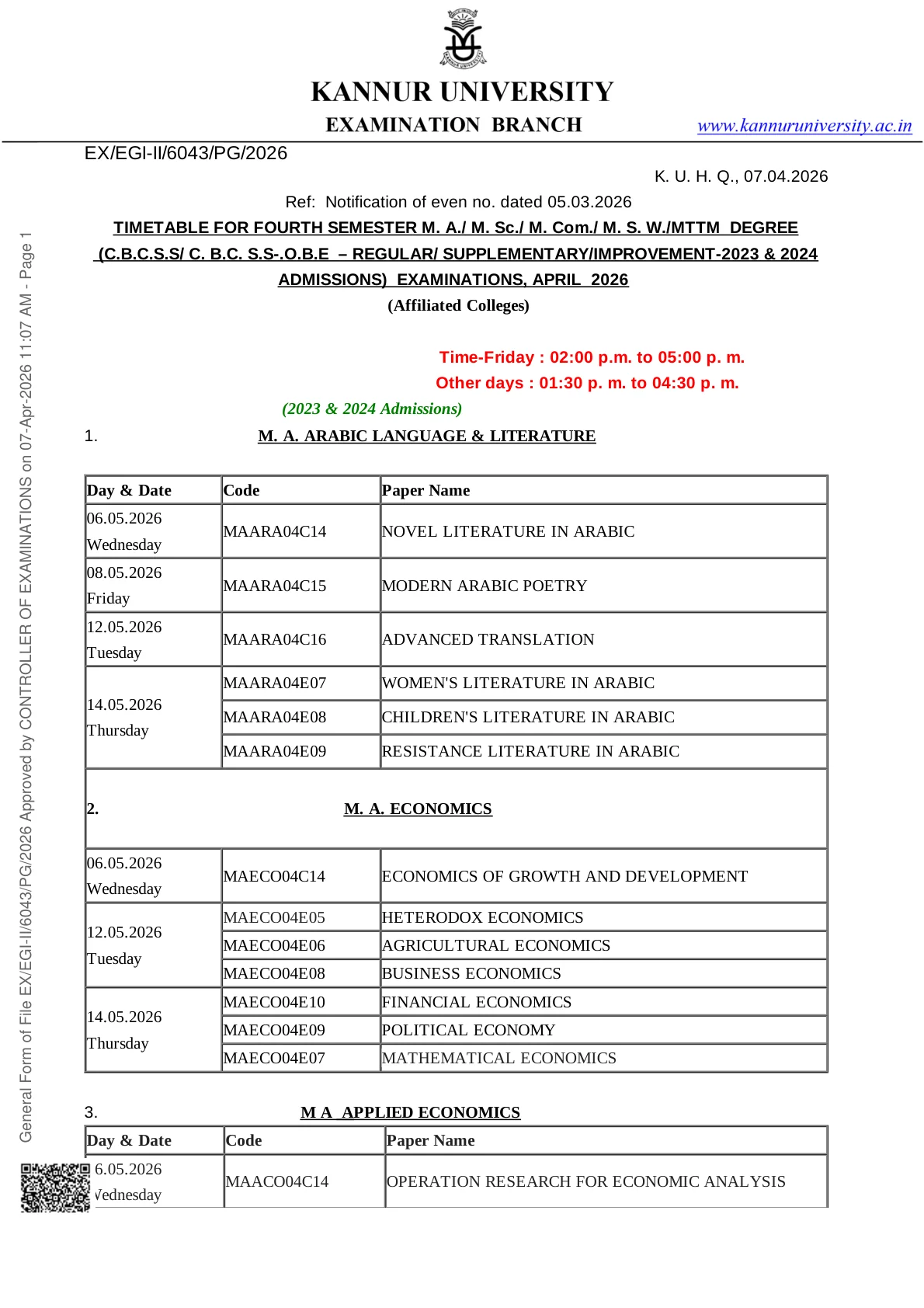
Kannur University has published Time Table 2026 information online for the April 2026 examination cycle, with the official PDF hosted on the university's examination portal. For students, the most important step is to open the correct PDF, confirm the semester and programme, and match each paper with the date and session shown in the schedule.
The official university ecosystem also shows related April 2026 postgraduate examination activity, including fourth semester PG private registration notices and the 2025-26 academic cum examination calendar. Together, these sources help students understand the exam cycle, identify the correct timetable document, and avoid confusion between regular, supplementary, and improvement schedules.
This page focuses on what students actually need first: where the official timetable is available, what the PDF is for, how to download it, what details to check on it, and what to do if there is any mismatch in paper code, date, or scheme.
Latest Update on Kannur University Time Table 2026
Kannur University Time Table 2026 is available online through official university sources. The reference PDF linked on the official examination portal is the main document students should use for checking their exam schedule.
The university's official announcements and examination-related pages also show that April 2026 is an active examination session for postgraduate students, including fourth semester PG-related notices. This makes it important for candidates to verify that they are opening the correct timetable PDF for their exact programme and semester.
What the Time Table 2026 Is For
This timetable update is meant for Kannur University students who need the official exam schedule for the relevant 2026 examination cycle. The linked update is associated with postgraduate examinations in the April 2026 session.
Students should not assume that one PDF applies to every course. Kannur University publishes multiple schedules across UG, PG, private registration, integrated programmes, MBA, MCA, and other streams. Always confirm the exact programme, semester, admission batch, and exam scheme printed on the PDF before following it.
Official Sources Students Should Use
The safest sources for Kannur University Time Table 2026 are:
- The main Kannur University website
- The official examination portal and PDF links hosted on university domains
- The university announcements page for related exam notices
- The 2025-26 Academic Cum Examination Calendar for broader semester timing context
Students should avoid depending only on screenshots, social posts, or copied tables from unofficial websites when planning their exam dates.
How to Download the Kannur University Time Table 2026 PDF
- Open the official Kannur University website or the official examination portal.
- Go to the examination or timetable section.
- Find the relevant 2026 timetable PDF for your programme and semester.
- Open the PDF carefully and verify the title before downloading.
- Save a copy on your device and keep one printable version for reference.
If multiple PDF files are listed, select only the document that exactly matches your course, semester, and exam session.
Details to Check on the Time Table PDF
After downloading the official PDF, students should review every line of the timetable and confirm the following points:
- Name of the university
- Programme or course name
- Semester number
- Admission batch or scheme
- Exam month and year
- Paper code and paper title
- Exam date and day
- Time of examination
- Any notes on supplementary, improvement, CBCSS, CBCS, or other patterns
Even a small mismatch in paper code or scheme can lead to confusion, so students should compare the PDF with their hall ticket, registration details, and department communication.
Related April 2026 PG Examination Context
Kannur University's official announcements page contains exam-related updates connected with the April 2026 postgraduate cycle, including fourth semester PG private registration notices. These related updates help confirm that the university is processing fourth semester PG examination activities during this session.
Students should use these related official notices only as supporting context and still treat the specific timetable PDF as the final source for paper-wise exam dates and timings.
What the Academic Calendar Adds
The university's Academic Cum Examination Calendar for 2025-26 is a useful supporting document because it shows the broader examination cycle, including notification windows, tentative commencement periods, conclusion periods, and result publication timelines for different programme categories.
The calendar is helpful for understanding the semester flow, but students should remember that the actual paper-wise date sheet comes from the specific timetable PDF, not from the broad calendar alone.
What Students Should Do Before the Exam
- Download the official timetable PDF and save a copy offline.
- Check your paper code against the syllabus or registration record.
- Confirm whether your exam is regular, supplementary, or improvement.
- Watch for any revised PDF or corrigendum on the official portal.
- Keep your hall ticket and identity proof ready once issued.
- Follow department or college-level instructions if practical, viva, or project-related components are scheduled separately.
This avoids last-minute confusion, especially where multiple schemes or admission years are running in the same exam session.
What to Do If There Is Any Discrepancy
If you notice that your paper title, paper code, semester, admission batch, or exam date does not match your records, do not rely on guesswork. Check the latest PDF again from the official portal and then contact your department, college office, or examination section.
Students should also keep checking the university announcements page because changes, clarifications, and related examination instructions may be posted there separately.
Best Way to Track Further Updates
The most reliable update routine is simple:
- Visit the official university website.
- Open the examination portal.
- Check the announcements page for exam-related notices.
- Re-download the PDF if a revised timetable appears.
Students should not assume that an older downloaded copy will remain unchanged throughout the exam cycle. Always confirm the latest version before the first paper.
Official Links
Frequently Asked Questions
Yes. Kannur University Time Table 2026 is available online through official university sources and PDF links on university domains.
You can download it from the official Kannur University website or its official examination portal.
You should verify your programme, semester, admission batch, paper code, exam date, time, and whether the schedule is regular, supplementary, or improvement.
No. The academic calendar gives the broader exam cycle, while the timetable PDF gives the paper-wise exam dates and timings.
Check the latest PDF again on the official portal and contact your department, college office, or examination section for clarification.
No. You should rely only on the official PDF and related notices published on Kannur University domains.