
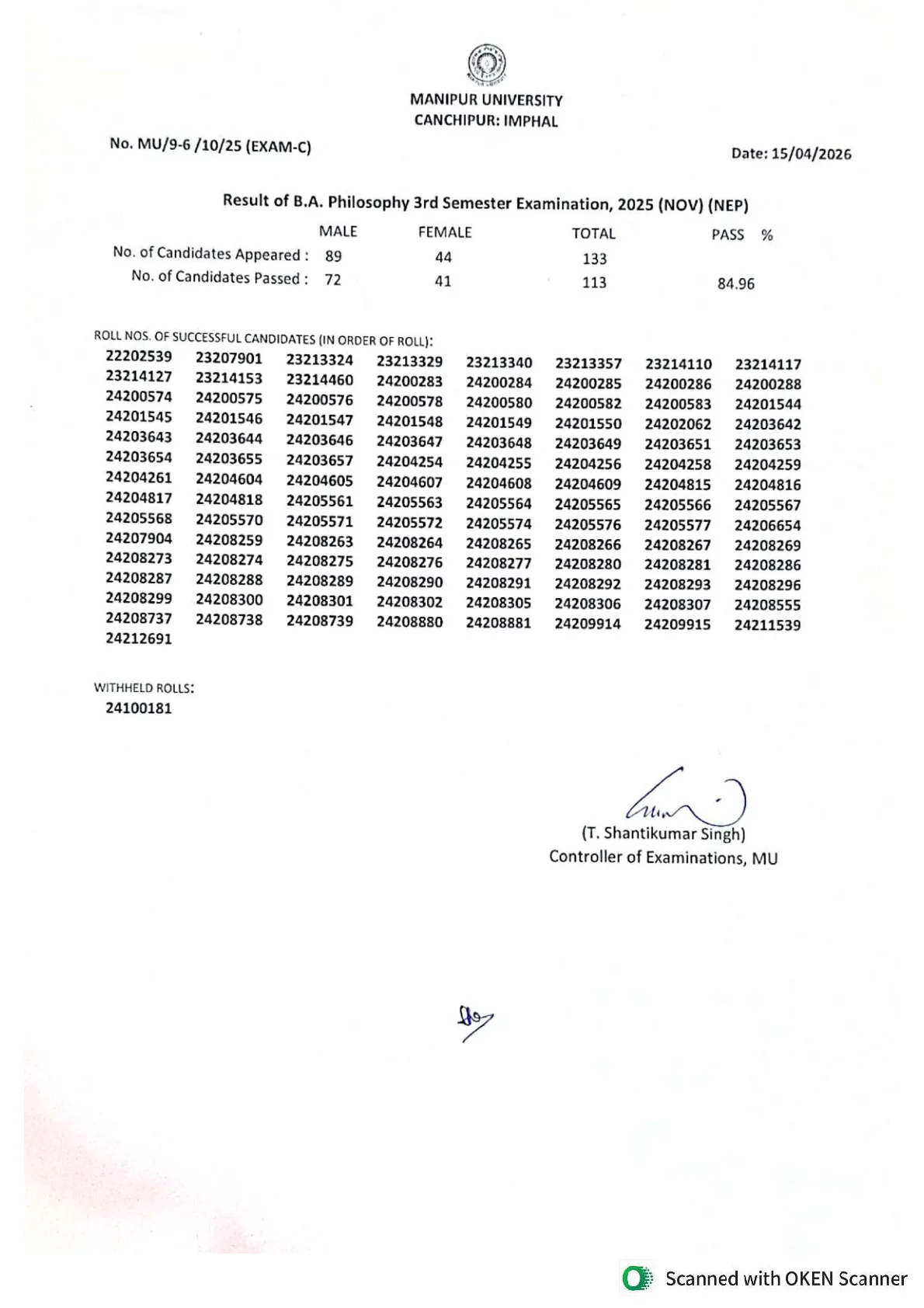
Manipur University has released the November 2025 3rd semester results for the courses covered in this update on its official exam result page. Students who were searching for the Manipur University Result 2026 can now use the university website to open the course-wise result PDFs and check whether their roll number appears in the list of successful candidates.
The result update tied to this topic is not a single combined marksheet for every BA or BSc programme. The official result page currently shows separate PDF releases dated 15 April 2026 for BA Philosophy 3rd Semester Examination 2025 (Nov) (NEP), B.Sc 3rd Semester Examination 2025 (Nov) (Old/Back), and Bachelor of Physical Education and Sports 3rd Semester Examination 2025 (Nov) (NEP).
Students should therefore match the exact course name and result type before downloading any file. After opening the correct PDF, check the roll number list, result category and any withheld entry shown in the document. The university also maintains a separate online provisional marksheet or gradesheet portal, which students can monitor for downloadable marksheets where available.
Manipur University Result 2026 latest update
Manipur University has published the relevant 3rd semester November 2025 result PDFs on its official exam result page. The release tied to this topic is dated 15 April 2026 and covers separate course-wise result documents rather than one common result file.
The result entries currently visible for this update are BA Philosophy 3rd Semester Examination 2025 (Nov) (NEP), B.Sc 3rd Semester Examination 2025 (Nov) (Old/Back), and Bachelor of Physical Education and Sports 3rd Semester Examination 2025 (Nov) (NEP).
Direct official links for BA, BSc and BPES 3rd Semester results
Use only the official university links below to access the result PDFs and the result portal.
| Result item | Official source |
|---|---|
| BA Philosophy 3rd Semester Examination 2025 (Nov) (NEP) | Download PDF |
| Bachelor of Physical Education and Sports 3rd Semester Examination 2025 (Nov) (NEP) | Download PDF |
| B.Sc 3rd Semester Examination 2025 (Nov) (Old/Back) | Download PDF |
| University exam result page | Open result page |
Students should check the exact course title before downloading because the university lists each result separately.
Course-wise result details and pass summary
The official PDFs provide a brief statistical summary for each released result. This helps students confirm whether they are checking the correct result file.
| Course | Exam type | Appeared | Passed | Pass percentage |
|---|---|---|---|---|
| BA Philosophy 3rd Semester | 2025 (Nov) NEP | 133 | 113 | 84.96% |
| Bachelor of Physical Education and Sports 3rd Semester | 2025 (Nov) NEP | 407 | 374 | 91.89% |
| B.Sc 3rd Semester | 2025 (Nov) Old/Back | 49 | 47 | 95.92% |
The BA Philosophy PDF also shows a withheld roll entry, and the BPES PDF shows a withheld roll list. Students whose numbers do not appear in the successful candidate list should review the result type carefully and contact the examination section if needed.
How to download the Manipur University result PDF
- Open the official Manipur University exam result page.
- Locate the 3rd semester result entries dated 15 April 2026.
- Select the correct course result PDF.
- Open the file and search for your roll number in the successful candidate list.
- Save the PDF to your device for future reference.
This method is the most direct way to confirm whether your result has been published for the specific course and result category shown by the university.
How to check the online provisional marksheet or gradesheet
Manipur University also maintains an online provisional marksheet or gradesheet portal. Students can use the official portal homepage to check whether the relevant marksheet page for their examination session is available.
- Open the official online marksheet or gradesheet portal.
- Select the available examination session shown on the portal.
- Choose the relevant examination name, college and roll number if the page is active for your result.
- Download the provisional marksheet or gradesheet when available.
The university notes on the portal that only the eligible candidates shown in the relevant result workflow can download the online provisional marksheet or gradesheet. If the 2025 November page is not yet visible, students should continue checking the official result and marksheet portals.
What to verify after opening your result
After downloading the PDF or accessing the marksheet portal, verify the academic details carefully before using the result for any official purpose.
- Correct course name
- Correct semester
- Correct examination session
- Roll number
- Result category such as NEP or Old/Back
- Withheld status, if shown
- Provisional marksheet or gradesheet availability, if applicable
This step matters because Manipur University publishes separate files for different courses, semesters and examination patterns.
Understanding NEP, Old and Back result categories
The result PDFs in this release do not all belong to the same academic pattern. Students should not treat them as interchangeable.
- NEP indicates that the result belongs to the National Education Policy pattern used for the concerned course.
- Old or Back indicates an earlier scheme or a back paper category rather than a regular NEP semester result.
- BA Philosophy and BPES in this update are listed under NEP.
- B.Sc in this update is listed as Old/Back.
If you check the wrong category, you may assume your result is missing even when it has already been published under a different label.
What to do if your roll number is not found
If your roll number does not appear in the PDF, do not assume immediately that the result is unavailable. First confirm that you opened the correct file for your course and result type.
- Check whether your course result is listed under a different subject or stream name.
- Confirm whether your result falls under NEP, Old, Back or another category.
- Review whether your roll number is shown in a withheld list.
- Check the exam result page again for later updates.
- Contact the Manipur University Examination Section through official university channels if the issue continues.
This is especially important for students in BA and BSc streams because the university often publishes subject-wise result PDFs rather than one single combined file.
What to do after downloading the result
Once you have confirmed your result, keep both a saved copy of the PDF and any downloadable provisional marksheet or gradesheet available on the official portal. These documents may be required for internal college processes, further semester admission, scholarship updates or record verification.
If the final marksheet is issued later through the college or the university, follow the institution's instructions for collection and record correction. Students who find any mismatch should raise it early with the examination authorities.
Official Links
Frequently Asked Questions
Yes. Manipur University has released the relevant 3rd semester November 2025 result PDFs on its official exam result page.
The official entries tied to this update are BA Philosophy 3rd Semester 2025 (Nov) (NEP), B.Sc 3rd Semester 2025 (Nov) (Old/Back), and Bachelor of Physical Education and Sports 3rd Semester 2025 (Nov) (NEP).
The relevant result PDFs on the official exam result page are dated 15 April 2026.
You can download it from the official Manipur University exam result page at manipuruniv.ac.in and open the specific course-wise PDF listed there.
Yes. Manipur University maintains an official online provisional marksheet or gradesheet portal. Students should check whether the relevant examination session page is available there.
First verify that you opened the correct course and result category. Then check whether your case falls under NEP, Old, Back or withheld status, and contact the Examination Section if needed.
It means the B.Sc result in this update is published under the old or back paper category, not as a regular NEP 3rd semester result.