
The University of Mumbai has released the MSc Computer Science Semester II Supplementary result under NEP 2020 on its official result portal. Students searching for the Mumbai University M.Sc Result 2026 for this specific course should use the direct PDF link published on mumresults.in and carefully review the office register details instead of relying on third-party summaries.
This result is specifically for the Master of Science (Computer Science) Semester II Supplementary examination held in December 2025. The official PDF shows course-wise marks, subject components, total marks, result status and semester performance details for the students listed in the register.
If you are checking this result for the first time, the most important thing is to verify that you are opening the correct result file. Mumbai University publishes many result PDFs with similar titles, so students should match the course name, semester, supplementary status and NEP 2020 label before using the result for any academic purpose.
Mumbai University MSc result 2026 latest update
The University of Mumbai has published the Master of Science (Computer Science) Semester II Supplementary result under NEP 2020 on its official result portal. The result appears on the portal as a separate PDF entry for this exact programme and semester, so students should open only the matching result file.
This release is tied to the Semester II Supplementary examination held in December 2025. It is not the regular Semester II result and should not be confused with other MSc Computer Science result PDFs listed on the same portal.
Direct official link to download the result PDF
Students can use the official result portal or the direct PDF link published by Mumbai University.
| Link type | Official link |
|---|---|
| Direct PDF | Download MSc Computer Science Semester II Supplementary result PDF |
| Result portal | Open University of Mumbai result portal |
If the PDF does not open immediately on mobile, try downloading it first or opening it in a browser with PDF support.
What this result is for
This result is specifically for the following examination:
- Course: Master of Science (Computer Science)
- Semester: Semester II
- Scheme: NEP 2020
- Result type: Supplementary
- Examination held in: December 2025
Students should check these details before using the result PDF, because the Mumbai University result portal also lists regular semester results, updated versions and results for other MSc programmes.
How to check the Mumbai University MSc supplementary result
- Open the official University of Mumbai result portal.
- Find the entry for Master of Science (Computer Science) Semester II Supplementary under NEP 2020.
- Click the PDF link.
- Use the search tool in the PDF viewer to find your seat number.
- Read the marks, result status, total and SGPA details carefully.
- Download or print the PDF for record purposes.
Because this result is published in office register format, students normally need to search by seat number rather than by name alone.
What details are available in the official office register
The published PDF is an office register, not just a simple pass list. It contains detailed academic information for each listed candidate.
- Seat number
- Student name
- Status such as repeater where applicable
- Gender
- ERN
- College or centre code
- Subject-wise marks
- Total marks
- Result status
- Semester credit details
- SGPA details where applicable
This makes the official PDF useful for verification, but students should still wait for any formal marksheet or statement of marks process required by their department or college.
Subjects included in this Semester II supplementary result
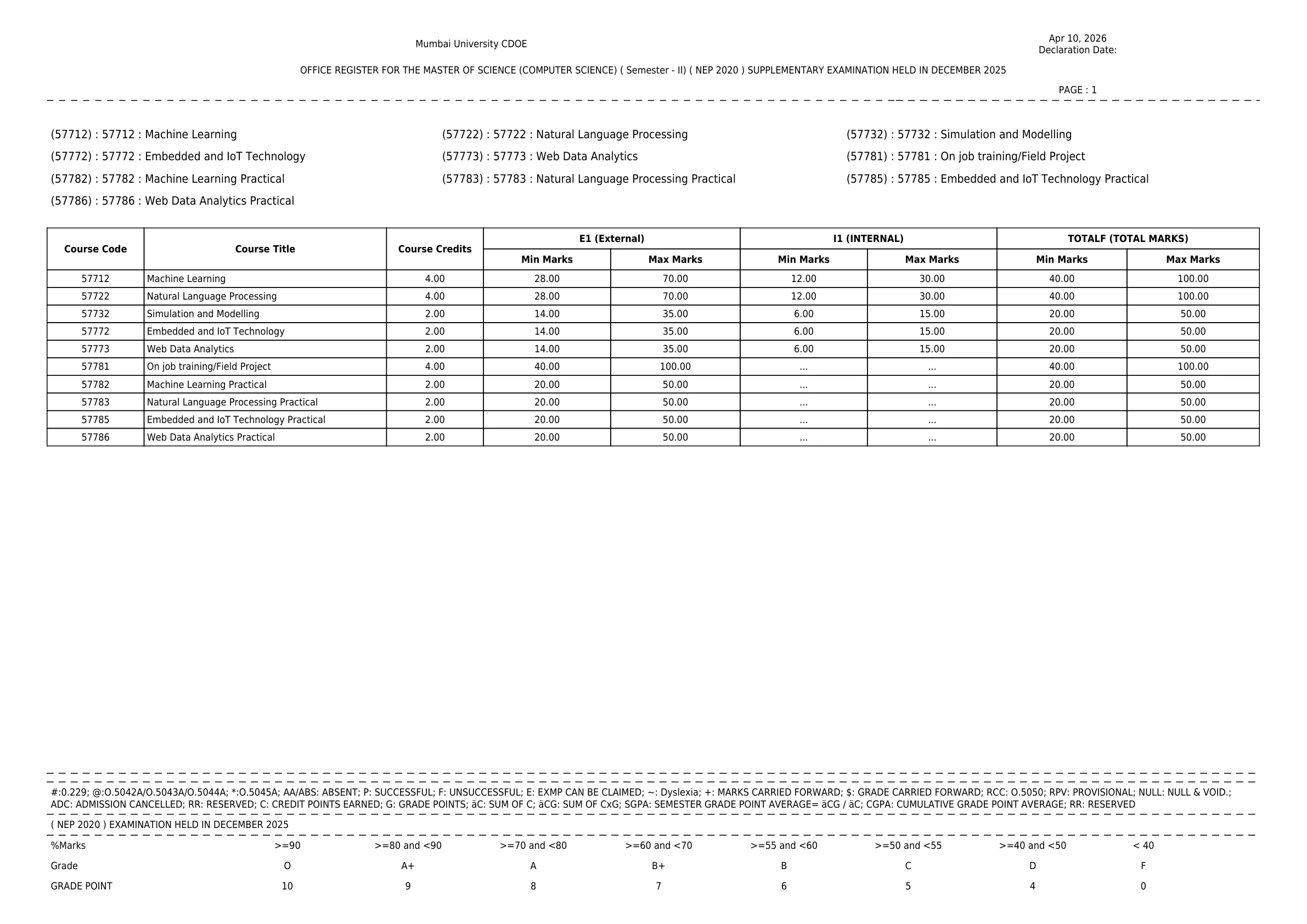
The official PDF lists the Semester II course components and marking structure for this MSc Computer Science supplementary result.
| Course code | Subject |
|---|---|
| 57712 | Machine Learning |
| 57722 | Natural Language Processing |
| 57732 | Simulation and Modelling |
| 57772 | Embedded and IoT Technology |
| 57773 | Web Data Analytics |
| 57781 | On Job Training / Field Project |
| 57782 | Machine Learning Practical |
| 57783 | Natural Language Processing Practical |
| 57785 | Embedded and IoT Technology Practical |
| 57786 | Web Data Analytics Practical |
The PDF also shows the credit and minimum-passing structure for theory, internal and practical components, which helps students understand how the final result was calculated.
How to read PASS, FAILED, ABSENT and other result terms
The office register uses short result terms and abbreviations that students should understand before interpreting the outcome.
- PASS means the candidate has cleared the semester result as shown in the register.
- FAILED means one or more required components were not cleared.
- ABSENT or AA/ABS indicates absence in a component.
- RR means reserved.
- RPV means provisional.
- ADC means admission cancelled.
- NULL means null and void.
If your result line shows a zero SGPA or a failed component despite good marks in other papers, review the subject-wise entries carefully. A single uncleared paper or absent component can affect the overall result status.
What to verify after downloading the result
Students should verify the following details before using the result for any application, progression or record purpose:
- Correct course name and semester
- Supplementary label
- NEP 2020 label
- Seat number
- Subject-wise marks
- Total marks
- Result status
- SGPA or credit details shown in the register
If any of these details are incorrect, keep a copy of the PDF page and contact the concerned university examination channel or department without delay.
What to do if there is an issue with the result
If your marks look incomplete, your seat number is missing, or the result status does not match your expectation, do not rely on assumptions. First confirm that you have opened the correct supplementary PDF and checked the correct seat number.
- Recheck the course title and semester.
- Confirm that the PDF is for the supplementary result, not the regular result.
- Search again using the exact seat number.
- Keep a downloaded copy of the PDF for reference.
- Use the university's examination channels for any formal correction, photocopy or grievance process.
The University of Mumbai also provides examination-related result and revaluation information on its main website, which students can use if a post-result process becomes necessary.
What students should do next
After checking the result, save the official PDF and note your subject-wise performance. If you have cleared the supplementary examination, keep the result copy ready for departmental verification, future semester records or academic documentation.
If you have not cleared the required component, follow the latest examination and result instructions published by the University of Mumbai. Students should use only official university sources for follow-up actions such as result clarification, photocopy, grievance or any later revaluation-related process.
Official Links
Frequently Asked Questions
Yes. The University of Mumbai has released the Master of Science (Computer Science) Semester II Supplementary result under NEP 2020 on its official result portal.
You can download it from the official University of Mumbai result portal at mumresults.in or open the direct PDF link published for this exact result entry.
This result is for the Master of Science (Computer Science) Semester II Supplementary examination under NEP 2020, held in December 2025.
The PDF shows seat number, student name, status, ERN, subject-wise marks, total marks, result status, credits and SGPA-related details where applicable.
Open the PDF and search using your exact seat number. This is usually the fastest and most accurate way to find your entry in the office register.
FAILED means the candidate has not cleared one or more required components. ABSENT means the candidate was absent in a paper or component shown in the register.
First confirm that you checked the correct supplementary PDF and seat number. Then keep a copy of the result page and use the official University of Mumbai examination channels for correction or grievance-related action.