
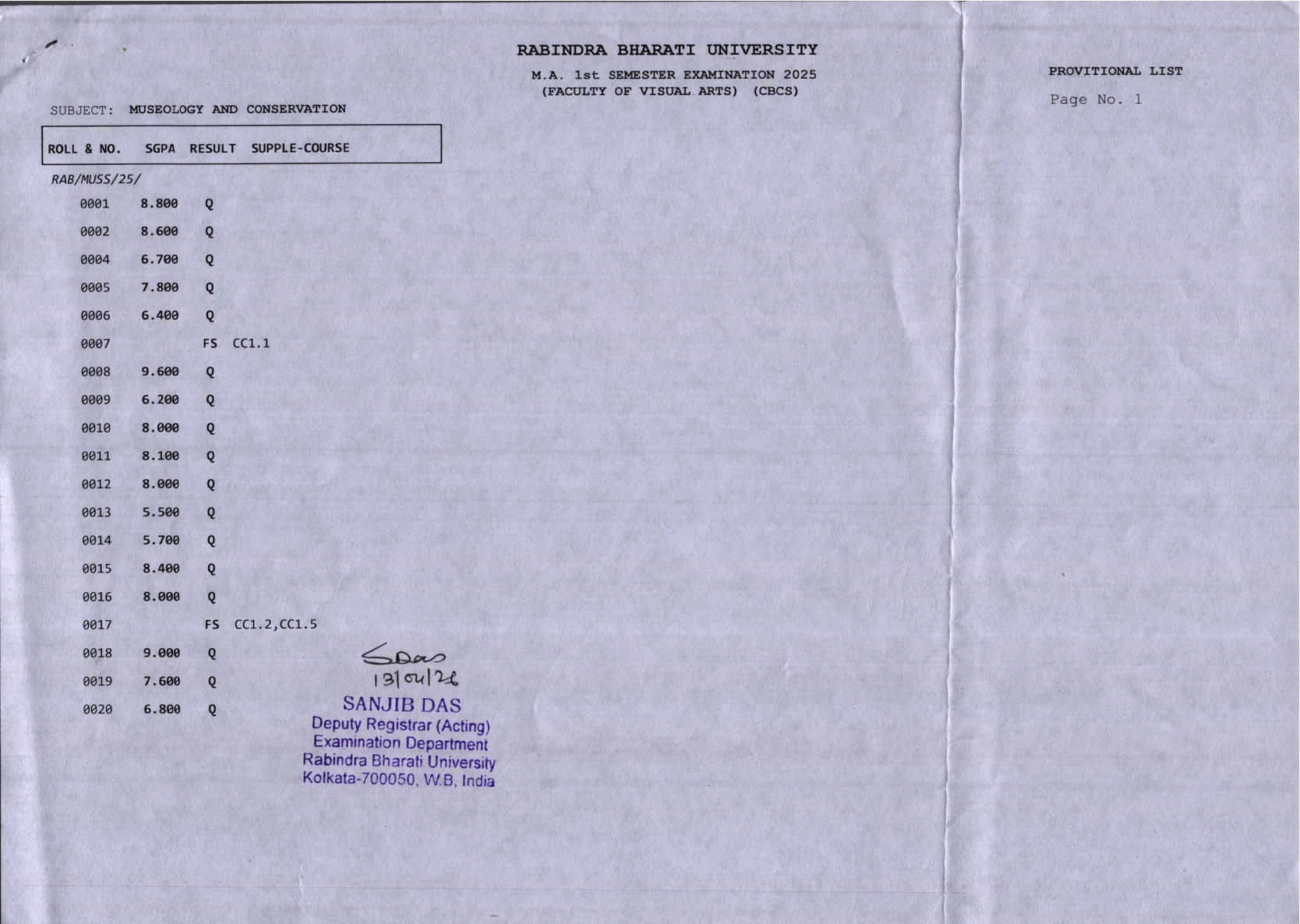
Rabindra Bharati University has published MA 1st Semester and MA 3rd Semester results through its official examination section in PDF format. For students searching for RBU Result 2026, the important point is that the university is not using a single marks-login style result page for this update. Instead, it is releasing course-wise result PDFs under the examinations archive on the official website.
This means you need to identify the correct subject and semester first, then open the matching PDF and verify your roll number, SGPA, and any remarks shown in the provisional list. On the official 2026 examinations page, RBU has listed multiple MA result PDFs across the Faculty of Arts, Faculty of Fine Arts, and Faculty of Visual Arts, including MA 1st Semester and MA 3rd Semester result entries published in April 2026.
This guide stays tightly focused on the exact user need behind the topic: where to find the official RBU MA 1st and 3rd Semester result PDFs, which subjects are covered in the released batches, how to check the result correctly, and what to do next if your roll number is missing or any detail looks wrong.
What RBU Result 2026 means for MA 1st and 3rd Semester students
For this topic, RBU Result 2026 refers to the MA 1st Semester and MA 3rd Semester result PDFs published on the official Rabindra Bharati University examinations page in 2026. The university is releasing subject-wise provisional lists rather than one combined result dashboard.
Students should therefore look for the exact subject title, semester, faculty, and exam year mentioned in the PDF heading before checking the result.
Direct official link to download RBU MA result PDFs
Use these official RBU links only:
The examinations page is the main source for MA 1st and 3rd Semester result PDFs. Open that page, locate the correct result title, and download the PDF hosted on the official university domain.
Which MA 1st and 3rd Semester results are visible on the official RBU page
On the official 2026 examinations page, Rabindra Bharati University has listed multiple MA result entries. The visible result titles include the following released batches:
| Semester | Subject | Faculty | Date shown on page |
|---|---|---|---|
| MA 1st Sem | Museology and Conservation | Visual Arts | 13 April 2026 |
| MA 1st Sem | Rabindra Sangeet | Fine Arts | 13 April 2026 |
| MA 1st Sem | Dance | Fine Arts | 13 April 2026 |
| MA 1st Sem | Environmental Studies | Arts | 08 April 2026 |
| MA 1st Sem | Geography | Arts | 08 April 2026 |
| MA 1st Sem | Sanskrit | Arts | 01 April 2026 |
| MA 3rd Sem | Journalism and Mass Communication | Arts | 13 April 2026 |
| MA 3rd Sem | Musicology | Fine Arts | 13 April 2026 |
| MA 3rd Sem | Bengali | Arts | 09 April 2026 |
| MA 3rd Sem | Economics | Arts | 09 April 2026 |
| MA 3rd Sem | Political Science | Arts | 08 April 2026 |
| MA 3rd Sem | Philosophy | Arts | 08 April 2026 |
If your subject is not in the first visible set, keep checking the official archive page because RBU publishes result PDFs batch by batch.
How to download and check your RBU MA result
- Visit the official RBU examinations page.
- Find the exact MA result entry for your semester and subject.
- Open the linked PDF file.
- Download the PDF to your device.
- Use the PDF search option to locate your roll number.
- Check the result line carefully and save a copy for future use.
Do not rely on copied result tables from third-party sites. The university PDF is the primary record for this result update.
What details are shown in the official RBU result PDF
The official result PDFs are presented as provisional lists and typically include core result fields such as:
- University name
- Exam name and semester
- Faculty name
- Subject name
- Roll number
- SGPA or Q-SGPA
- Result field
- Supplementary or course remarks where applicable
Before using the result for academic follow-up, make sure the semester, subject, and roll number in the PDF match your record exactly.
What the reference PDF in this topic shows
The official PDF supplied in the reference set is hosted on the RBU domain and is an MA 1st Semester Examination 2025 result under the Faculty of Visual Arts for the subject Museology and Conservation. It is marked as a provisional list and includes roll numbers, SGPA, result entries, and supplementary course remarks where applicable.
This is useful because it confirms the format RBU is using for MA result publication in 2026: subject-wise PDF lists rather than a single combined university result screen.
How to identify the correct MA 1st or 3rd Semester PDF
RBU publishes separate PDFs for each subject. To avoid opening the wrong file, match all of the following before you download:
- Semester number
- Subject name
- Faculty name
- Exam year mentioned in the PDF heading
- Date shown on the examination page
For example, MA 1st Semester results and MA 3rd Semester results are mixed together on the same examination archive page, so semester matching matters.
What to do if your roll number is missing or the result looks incorrect
If your roll number is not visible in the correct PDF, first confirm that you opened the right subject and semester file. If the PDF is correct and the record is still missing, keep a screenshot and contact your department or the university examination section using official channels.
If any detail such as semester, subject, result line, or SGPA appears incorrect, avoid making assumptions from unofficial sources. Use the official university site and follow the examination branch instructions for correction or later review-related notices.
What provisional list means for RBU result students
The PDFs visible for these MA results are marked as provisional lists. In practical terms, students should treat the online PDF as the immediate published result record but keep checking the official RBU site for any review result, correction, or follow-up examination notice.
It is a good idea to save the downloaded PDF and maintain a copy until the next academic step, marksheet collection process, or any university communication is completed.
What to do after downloading the result PDF
- Save the PDF locally.
- Mark your roll number and result line for quick reference.
- Verify semester, subject, and SGPA details.
- Check the official examinations page again for any review or related follow-up notice.
- Use only RBU official pages for any next step.
This is especially important because RBU publishes examination updates in separate notices and PDFs, not always through one central result interface.
Official Links
Frequently Asked Questions
You can download it from the official Rabindra Bharati University examinations page at https://www.rbu.ac.in/home/examinations/.
For this result update, RBU is publishing MA results as subject-wise PDF files on the official examinations page.
RBU stands for Rabindra Bharati University, based in West Bengal.
Check your roll number, semester, subject, SGPA or Q-SGPA, and any result or supplementary remarks shown in the PDF.
First confirm that you opened the correct semester and subject PDF. If it is still missing, contact the university or your department through official channels.
Yes. The PDF is hosted on the official rbu.ac.in domain and relates to an MA 1st Semester result.
The available result PDFs are marked as provisional lists, so students should keep checking the official site for any later review or correction-related notice.